Expedited troubleshooting and support for technical issues.
GET THE SUPPORT SUBSCRIPTION TODAY
Price List: SoftScan Support / Update Subscription
Special offer available only to current customers! Support costs are only US$300.00 for the 1st license and US$200.00 for each additional license.
Hello from Soft Steel Inc.
Today we are reaching out our current costumers of SoftScan to recommend they renew their technical support and reap the full benefits of our program.
In the case of any issue, the support subscription ensures that our technicians address any question about our program’s features or troubleshoot technical issues that could arise during the scanning process in a expedited manner. This reduces any downtime you might experience.
The support subscription also ensures that you take complete advantage of our future releases including access to new features added later to the program.
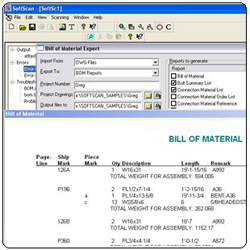
SoftScan is a generic Bill of Material scanner designed to read from various CAD systems that generates reports for fabrication and produces various output formats for production management. It’s a fully customizable scanner capable of understanding almost every different kind of bill of material.
SoftScan is a robust, stand-alone software system that reads any DWG, DXF or 3D-Cad/SmartCad file directly, and creates a file that can be imported into:
FabTrol
Fabsuite
StruMIS
EJE
Steel 2000
ROMAC
Structural Software
And Microsoft Excel
By simply selecting your drawings and clicking the scan button, the rest is automatic, and no 3rd party CAD system or software is required. SoftScan also produces a variety of reports based on the BOM including a Mill Order Report, Cutting List, Material Summary Report, Bolt Summary and Nesting Report.
The tedious task of typing Bills of Material into these software packages is now a thing of the past.
It’s simple user interface will have you scanning in minutes, and help you download hundreds of detailing sheets with a simple mouse click.
New Features
Runs from the cloud
Always running the latest version
Excell file scanning
Title-less Scanning
Save and Load your projects
Kiss File Version 1.1
Choose reports on the fly
Customizable Reports Format
New and friendlier user interface
New Type Code with no description required
Faster scanning engine
Exports
Steel2000
KISS Files
Structural Software
Microsoft Excel
EJE
Romac
Inputs
3D Cad / SmartKad
DWG / DXF
Microsoft Excel
Reports
Bill of Material
Connection Material List
Connection Material Order List
Connection Material Reference
Main Material Cutting List
Main Material Nesting
Main Material Order List
Main Material Order List with Marks
Bolt Summary List
Special Fields
Revisions
Sequences
Pay Code
Finishes
Features
Works with any DWG, DXF, or 3d-cad/SmartKad drawing file, from any source.
Reads drawing files directly.
Your detailer does his cad work as he normally would.
No special requirements or software while creating the drawings.
Can scan as many drawings as you wish (or select) with one click of the mouse.
Save the export file to your hard drive, floppy drive, or email directly from SoftScan.
Automatically locates and reads the BOM.
Completely User Definable fields and Bill of Material objects.
Once defined in the settings, Softscan will read it.
Fast, and simple to use. Just click SCAN!
Imperial or Metric, input and or output BOM fields can be in any order
Sequences scanned and exported with member Mill Mark (page-line) scanned and exported.
Revision number scanned and exported.
Works in most Windows platforms, on most PCs or Workstations (SoftScan is not designed to work on Servers or Networks).
User Configurable
Define input and output options
Define any field with any possible heading
Define, add, or delete any kind of main
member (W, TS, C, WT, etc).
Define, add, or delete any kind
of attachment (PL, BAR, L, etc).
Define, add, or delete any kind of bolt
Define, add, or delete any grade.
You can define general default grades,
and a default grade for each main member
type and attachment type,any font and as many fonts as you want.
Define the character mappings for allspecial characters in the font.
Define one of several methods of sequencing
Configuration automatically saved.
Now select your drawings, and click SCAN!
GET THE SUPPORT SUBSCRIPTION TODAY
Price List: SoftScan Support / Update Subscription
Special offer available only to current customers! Support costs are only US$300.00 for the 1st license and US$200.00 for each additional license.